


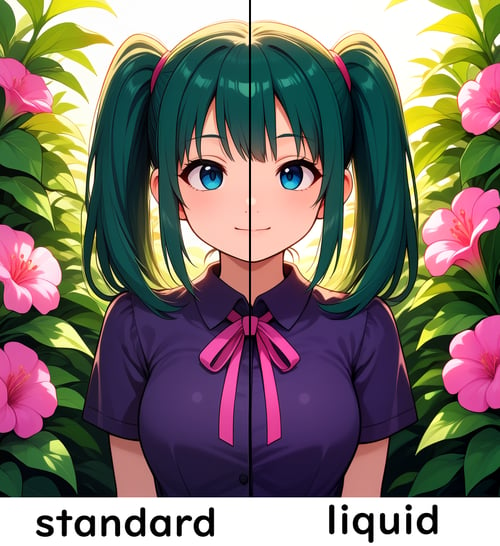
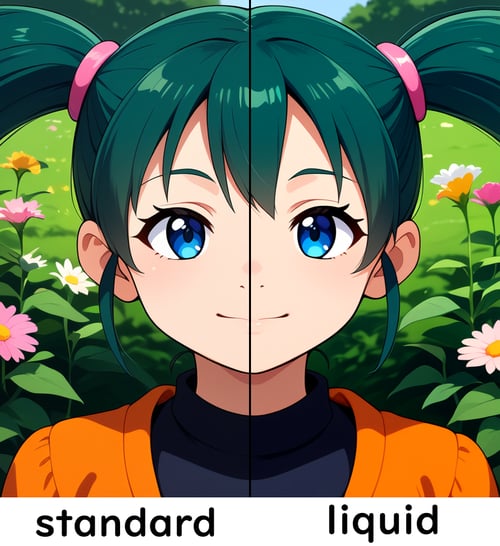
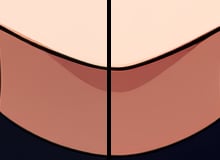
This merged VAE improves anime-style shading by refining the color balance and reducing visible gaps between lineart and fill colors. The merge also suppresses the white fringe that can appear between dark outlines and flat color areas, resulting in cleaner edges and more stable rendering.
Highlights keep a slight cool tint while shadows remain warm, producing smoother gradients and cleaner soft warm tones commonly used in stylized anime rendering.
As a trade-off, pink tones may appear slightly stronger in some situations, especially with warm lighting or high saturation. This behavior helps avoid muddy gradients, but it may not fit all styles.
This VAE was tested with Qwen-based image models, but it is also compatible with Anima-based models that use the same VAE format, and can be used as a drop-in replacement in most Anima workflows.
from PIL import ImageEnhance PALE_ORANGE = (238, 196, 172) LIGHT_BROWN = (198, 122, 96) DARK_BROWN = (110, 58, 42) PURE_BLACK = (18, 18, 18) def clamp8(x): return max(0, min(255, int(round(x)))) def lerp(a, b, t): return a + (b - a) t def smoothstep(edge0, edge1, x): if edge0 == edge1: return 1.0 if x >= edge1 else 0.0 t = (x - edge0) / (edge1 - edge0) t = max(0.0, min(1.0, t)) return t t (3.0 - 2.0 t) def apply_gamma_u8(v, gamma): x = max(0.0, min(1.0, v / 255.0)) return clamp8(255.0 (x * gamma)) def dist3(r1, g1, b1, r2, g2, b2): dr = r1 - r2 dg = g1 - g2 db = b1 - b2 return dr dr + dg dg + db db def snap_to_palette(rr, gg, bb, palette, strength=1.0): best = None best_d = None for pr, pg, pb in palette: d = dist3(rr, gg, bb, pr, pg, pb) if best_d is None or d < best_d: best_d = d best = (pr, pg, pb) pr, pg, pb = best rr = lerp(rr, pr, strength) gg = lerp(gg, pg, strength) bb = lerp(bb, pb, strength) return rr, gg, bb def preprocess_anime_color(img): img = ImageEnhance.Brightness(img).enhance(1.10) img = ImageEnhance.Color(img).enhance(1.04) img = ImageEnhance.Contrast(img).enhance(1.04) r, g, b = img.split() r = r.point(lambda x: clamp8(x 1.07)) g = g.point(lambda x: clamp8(x 1.04)) b = b.point(lambda x: clamp8(x 0.98)) img = img.merge("RGB", (r, g, b)) px = img.load() w, h = img.size for y in range(h): for x in range(w): rr, gg, bb = px[x, y] lum = (rr + gg + bb) / 3 maxc = max(rr, gg, bb) minc = min(rr, gg, bb) sat = maxc - minc avg = (rr + gg + bb) / 3 warm = rr > gg > bb # shadow S curve shadow_w = 1.0 - smoothstep(70, 115, lum) if shadow_w > 0: factor = (max(lum, 1) / 100.0) ** 1.2 rr = lerp(rr, rr factor, shadow_w) gg = lerp(gg, gg factor, shadow_w) bb = lerp(bb, bb factor, shadow_w) # mid tone fix midgray_w = smoothstep(75, 95, lum) (1.0 - smoothstep(120, 140, lum)) low_sat_w = 1.0 - smoothstep(65, 90, sat) fix_w = midgray_w low_sat_w if fix_w > 0: rr = lerp(rr, avg + (rr - avg) 0.85, fix_w) gg = lerp(gg, avg + (gg - avg) 0.85, fix_w) bb = lerp(bb, avg + (bb - avg) 0.75, fix_w) # lift shadow shadow_lift_w = smoothstep(90, 105, lum) (1.0 - smoothstep(135, 150, lum)) if shadow_lift_w > 0: rr = lerp(rr, rr 1.04 + 4, shadow_lift_w) gg = lerp(gg, gg 1.04 + 4, shadow_lift_w) bb = lerp(bb, bb 1.04 + 4, shadow_lift_w) # gamma skin midtone_w = smoothstep(70, 95, lum) (1.0 - smoothstep(170, 195, lum)) if midtone_w > 0: rr_gamma = apply_gamma_u8(rr, 0.95) rr = lerp(rr, rr_gamma, midtone_w) # highlight transparency if warm: bright_w = smoothstep(125, 145, lum) highlight_w = smoothstep(205, 225, lum) if bright_w > 0: rr = lerp(rr, rr 1.04, bright_w) gg = lerp(gg, gg 1.03, bright_w) bb = lerp(bb, bb 0.94, bright_w) if highlight_w > 0: rr = lerp(rr, rr 1.02, highlight_w) bb = lerp(bb, bb 1.05, highlight_w) # pink fringe fix fringe_w = 1.0 - smoothstep(10, 22, sat) if fringe_w > 0: gray = avg rr = lerp(rr, gray, fringe_w 0.9) gg = lerp(gg, gray, fringe_w 0.9) bb = lerp(bb, gray, fringe_w 0.9) # boundary cleanup boundary_w = smoothstep(55, 105, lum) (1.0 - smoothstep(150, 185, lum)) pinkish_w = smoothstep(8, 22, rr - gg) (1.0 - smoothstep(28, 55, gg - bb)) fix_boundary = boundary_w pinkish_w if fix_boundary > 0: rr = lerp(rr, rr 0.96, fix_boundary) gg = lerp(gg, gg 1.01, fix_boundary) bb = lerp(bb, bb * 0.90, fix_boundary) # palette snap warm_skin_like = rr > gg > bb if warm_skin_like: if lum > 170: pal = [PALE_ORANGE, LIGHT_BROWN] s = 0.7 elif lum > 95: pal = [LIGHT_BROWN, DARK_BROWN] s = 0.8 else: pal = [DARK_BROWN, PURE_BLACK] s = 0.85 rr, gg, bb = snap_to_palette(rr, gg, bb, pal, s) px[x, y] = ( clamp8(rr), clamp8(gg), clamp8(bb), ) return img
Suggested Resources
VAE
QW
ccollins
Qwen-Image VAE
6K0 1 2 3 4 5 6 7 8 9K
250 1 2 3 4 5 6 7 8 90 1 2 3 4 5 6 7 8 9
10 1 2 3 4 5 6 7 8 9
640 1 2 3 4 5 6 7 8 90 1 2 3 4 5 6 7 8 9
Checkpoint
CREATE
Liquidn2
Anima_LiquidMix
1.3K0 1 2 3 4 5 6 7 8 9.0 1 2 3 4 5 6 7 8 9K
190 1 2 3 4 5 6 7 8 90 1 2 3 4 5 6 7 8 9
50 1 2 3 4 5 6 7 8 9
820 1 2 3 4 5 6 7 8 90 1 2 3 4 5 6 7 8 9
Discussion
3 months ago
Show More
I haven't played with image generators a while, but I found out with SDXL models with a custom VAE and some weird setup you can get native transparent output. Could you by chance fine-tune something to do this? Getting line art that is transparent out of it so I can practice art would be neat
10 days ago
This somewhat fixes the half-tone texture I've been getting with Anima gens. Thank you!